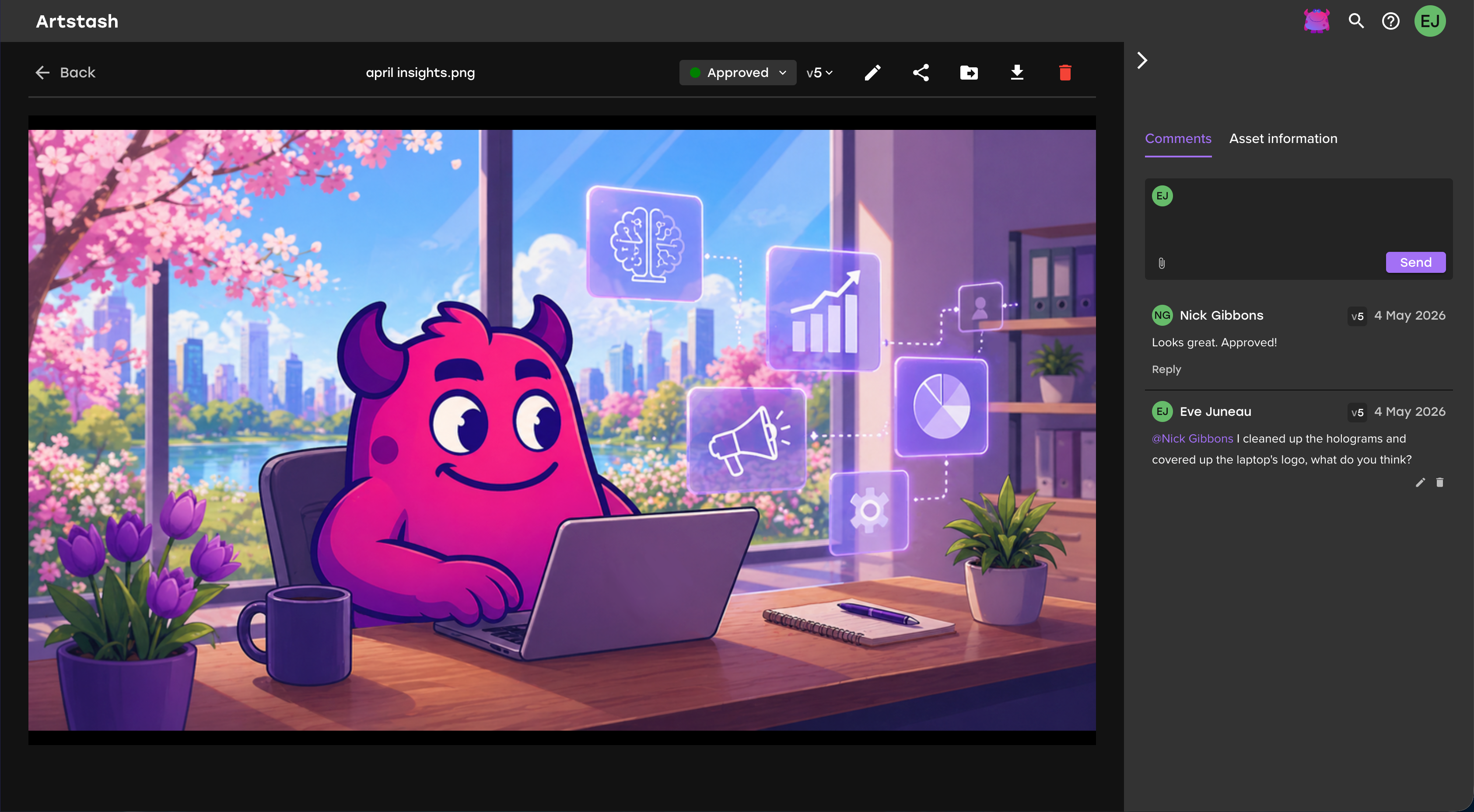
Quick answer: A working creative review and approval workflow has five parts: a single place where the asset and its feedback live together, comments anchored to the asset itself rather than a filename, explicit approval states tied to specific versions, a defined set of reviewers with one named decision-maker, and an audit trail of who approved what. The distinction that matters most is that feedback is not approval — a comment saying "looks good" is not a sign-off. Teams that separate any of these, most commonly by leaving feedback in Slack while the file sits in a shared drive, typically lose 4–6 days per creative to reconciliation and version confusion. At 20 creatives a week, that compounds into the single biggest bottleneck in the UA pipeline.
What Are the Stages of a Creative Review Workflow?
| Stage | What happens | Who owns it | Common failure |
|---|---|---|---|
| 1. Brief lock | Requirements, specs, success criteria and a testable hypothesis agreed before production | UA / creative strategist | No hypothesis, so reviewers judge on taste |
| 2. Internal review | Craft check: does it meet the brief and the quality bar | Creative lead | Merges with brand review; two audiences, one pass |
| 3. Spec / QC check | Dimensions, duration, file size, safe zones, platform rules | Producer or automated | Done by a human at the end instead of a machine at the start |
| 4. Stakeholder review | Brand, legal, publisher or licensor sign-off | Named approvers | Everyone invited, nobody accountable |
| 5. Final approval | Explicit sign-off tied to a version | Single named approver | "Approved" attaches to a filename, not a version |
| 6. Handoff to live | Asset moves to the network with its approval record | UA manager | Approval history lost at handoff |
| 7. Performance feedback | Results attach back to the creative record | UA manager | Loop never closes; next brief repeats old ideas |
Most teams have stages 1, 2 and 6. The pain almost always sits in 3, 4 and 5 — and stage 7 rarely exists at all.
Write a testable hypothesis into the brief
The single cheapest improvement to a review workflow happens before production starts. A brief that states what the asset is trying to prove gives reviewers something objective to judge against.
Compare "make three new video variants" with:
- "Test whether fail-state puzzle hooks drive stronger thumb-stop rates than success-state hooks."
- "Test whether character-led drama outperforms pure gameplay for lapsed players."
- "Test whether creator-style narration improves completion rate on short-form video."
When reviewers understand the hypothesis, they assess whether the asset is fit for purpose rather than whether they personally like it. Most subjective feedback loops start with a brief that never said what success looked like.
What Is the Difference Between Creative Feedback and Approval?
They are not the same thing, and conflating them is the most common structural fault in creative operations.
Feedback is collaborative. It improves the asset. It can come from anyone, be subjective, and arrive at any stage.
Approval is a decision. It confirms the asset is cleared for a specific campaign, channel and market.
A thumbs-up reaction in Slack is feedback. A folder containing ten versions is not an approval trail. A media buyer downloading a file is not confirmation that it is cleared.
A workflow needs explicit states that everyone can see:
| State | What it means |
|---|---|
| Draft | In production, not ready for review |
| In creative review | With the creative lead for craft assessment |
| Awaiting UA review | Craft approved, checking campaign and test fit |
| Awaiting brand or legal review | Escalated because a trigger applies |
| Awaiting localization review | Master approved, market variants outstanding |
| Changes requested | Specific, actionable revisions outstanding |
| Approved | Cleared for a named use, tied to a version |
| Rejected | Will not proceed; reason recorded |
| Live | Running on a network |
| Retired | No longer in rotation, retained for reference |
Without visible states, two failures follow. Assets sit collecting opinions with no defined moment of decision. Or someone launches a file that was never actually cleared.
Why Do Creative Approvals Take So Long?
Because feedback lives somewhere other than the asset.
A producer uploads v3 to a shared drive. Feedback arrives in Slack, in a doc comment, and verbally on a call. The producer reconciles three sources, exports v4 into a folder holding six near-identical filenames, and the UA manager asks where it is because the refresh window is closing.
Nobody in that chain is slow. The structure is.
Three specific mechanisms cause the delay:
Feedback fragmentation. Notes scattered across tools must be gathered and interpreted before any work can start. This is pure overhead — it produces nothing.
Version ambiguity. When approval attaches to a filename rather than a version, nobody can say with certainty what was approved. So teams re-review defensively. Anyone who has seen a folder containing puzzle-ad-final-approved-new-revised.mp4 knows how this ends.
Undefined decision rights. If five people can comment but nobody is named as the approver, the asset waits for whoever is slowest, and any of them can reopen it.
Who Should Be in a Creative Review, and Who Decides?
Keep reviewer groups small and separate them by purpose:
- Craft reviewers judge whether it is good. Creative lead, art director.
- Compliance reviewers judge whether it is allowed. Brand, legal, licensor.
- Performance reviewers judge whether it will work. UA manager, creative strategist.
Exactly one person holds final sign-off per asset. Consultation is broad; the decision is singular. Teams that skip this rule invariably describe their approvals as "waiting on stakeholders" without being able to name which one.
When Should Brand, Legal or IP Review Be Triggered?
Not every asset needs escalation, and routing everything through legal is as damaging as routing nothing. Define the triggers in advance so the decision is automatic rather than debated per asset.
Escalate when the creative involves:
- Licensed IP, characters or franchise elements
- Influencer, creator or celebrity likeness
- Claims about rewards, odds, progression or gameplay that differ from the live product
- Monetization, loot box or real-money mechanics
- Age-rating-sensitive content
- Comparative claims against another title
- App store assets, which carry their own policy surface
- Market-specific sensitivities in a target region
For licensed IP — a Marvel or Warhammer title, say — licensor approval is a distinct stage with its own turnaround. Schedule it as a dependency rather than discovering it as a surprise.
How Many Review Rounds Should a Creative Need?
Two, for most assets.
Round one catches concept and craft. Round two confirms the fixes. If an asset is on round four, the problem is upstream — the brief was unclear, or the wrong reviewers were involved, or specs were not checked before human eyes were spent.
What Should Be Automated Versus Reviewed by a Human?
This distinction is where most of the available time is.
| Check | Automate | Human |
|---|---|---|
| Dimensions, aspect ratio, duration | Yes | — |
| File size and format limits | Yes | — |
| Safe zones and text overlap | Yes | — |
| Platform policy flags (e.g. AI disclosure) | Yes | — |
| Brand color and logo usage | Partial | Edge cases |
| Does the hook work | — | Yes |
| Is this on-brand in tone | — | Yes |
| Will this resonate in this market | — | Yes |
Never spend human review time on things a machine can check. A reviewer who opens an asset only to find it is the wrong aspect ratio has burned a full cycle on something automatable. In Artstash the QC Agent flags spec violations before an asset reaches a human.
What Should You Capture at the Point of Approval?
Approval is the last moment an asset is guaranteed to have a human's attention. Whatever is not captured there is usually lost, which is why libraries fill with files nobody can find or reuse.
| Category | Fields to capture |
|---|---|
| Context | Game title, campaign, creative concept, hypothesis |
| Targeting | Channel, market, language, player motivation |
| Technical | Format, aspect ratio, duration, version |
| Content | Hook type, character or feature shown |
| Governance | Asset owner, approval status, approver, usage rights, localization status |
| Outcome | Launch date, campaign performance result |
The last row is the one most teams skip and the one that pays back most. An approved asset with a performance result attached becomes evidence for the next brief. Without it, the studio relearns the same lessons every quarter.
How Do You Review Formats That Most Tools Cannot Preview?
This is the practical wall most teams hit, and it is why review often collapses back into screenshots and screen recordings.
- Video needs frame-accurate comments. "The transition at 0:04" is actionable; "the bit near the start" is not.
- Images and key art need region-anchored comments pinned to the spot in question.
- 3D assets need a viewpoint. A note about geometry is meaningless without the angle it was seen from.
- HTML5 playables need to be playable in review. A video capture of a playable is not a review of a playable.
- Layered files (PSD and similar) need layer visibility, or feedback lands on a flattened composite that nobody actually ships.
Tools built for film — Frame.io and its peers — handle video excellently but do not preview 3D, layered PSDs or playables. Shared-drive comments tie feedback to a filename rather than a frame or region. Artstash supports on-asset commenting across video, images, 3D files and HTML5 playables, with approval states anchored to versions rather than filenames.
How Should Localized Variants Be Approved?
Localization breaks most approval workflows because they were designed around a single master asset. One approved concept can become a dozen market variants, each with its own copy, subtitles, cultural adaptation, rating language and platform requirements.
Track two separate gates:
- Master approval — the creative concept is cleared in principle
- Market approval — a specific localized variant is cleared for a specific territory
A global video can be creatively approved and still not cleared for Japan, Germany or Brazil. Without the distinction, teams either delay every launch until all markets are ready, or ship variants that were never reviewed for the market they are running in. Both are avoidable.
This matters most when a concept wins. The instinct is to scale it into every territory immediately, which is exactly when market approval gets skipped.
How Should External Reviewers Be Handled?
Brand leads, ad network reviewers, licensors and agency clients usually sit outside your tooling. The default workaround — exporting a file and emailing it — breaks the chain immediately, because their feedback returns outside the system and their approval never attaches to a version.
Guest review access that requires no seat keeps external feedback inside the record. Artstash supports guest reviewers without an Artstash seat, so agency and publisher-side approvals stay attached to the asset.
How Do You Measure Whether the Workflow Is Working?
Most teams can feel that approvals are slow but cannot say where. These metrics locate the problem:
| Metric | What a bad number tells you |
|---|---|
| Time from brief to approval | The headline figure; everything else explains it |
| Average revision rounds per asset | Rising means briefing quality has degraded |
| Assets rejected after production | The most expensive failure — brief was wrong |
| Percentage of approved assets launched | Low means you are producing more than you can run |
| Time from approval to live | Isolates handoff friction from review friction |
| Percentage of assets reused | Low means your library is not doing any work |
| Assets missing metadata | Predicts how findable the library will be in six months |
Rounds per asset and assets rejected after production are the two worth watching weekly. Both move before campaign performance does, which makes them early warnings rather than post-mortems.
Why Does This Matter More at Scale?
A team shipping 20 creatives a quarter can absorb a broken process. A team shipping 20 a week cannot.
Industry creative volume has risen sharply — Mobvista's 2025 analysis of six million creatives found advertisers running an average of 123 active creatives per month, with 58% newly launched each month. Approval load scales directly with output.
And as production automates, review becomes the constraint. Agentic pipelines can generate assets end to end, but automation cannot approve its own output. A four-day human approval turns an automated pipeline back into a manual one. Review is now the rate-limiter on the whole system.
Frequently asked questions
What is a creative review and approval workflow?
It is the defined process an asset moves through between production complete and live on a network: internal craft review, automated spec and QC checks, stakeholder or compliance review, a single named final approval tied to a specific version, and a retained record of who approved what.
What is the difference between creative feedback and creative approval?
Feedback is collaborative input that improves the asset and can come from anyone at any stage. Approval is a decision that clears the asset for a specific campaign, channel and market, tied to a specific version and made by one named person. A comment saying "looks good" is feedback, not approval.
Why do creative approvals slow down UA teams?
Because feedback is separated from the asset. Notes land in Slack, documents and calls while the file sits in a shared drive of near-identical filenames. Teams commonly lose 4–6 days per creative reconciling scattered feedback and resolving version confusion.
How many people should approve a creative?
Consultation can be broad, but exactly one person should hold final sign-off per asset. Separate reviewers by purpose — craft, compliance, performance — and name a single approver. Teams without a named approver wait for whoever is slowest.
How many review rounds is normal for an ad creative?
Two for most assets: one for concept and craft, one to confirm fixes. Consistently exceeding that points to an upstream problem — an unclear brief, the wrong reviewers, or specs not checked before human review.
What parts of creative review should be automated?
Anything objectively checkable: dimensions, aspect ratio, duration, file size, safe zones, and platform policy flags. Reserve human review for judgement — whether the hook works, whether the tone is on-brand, and whether it will land in a given market.
How should localized creative variants be approved?
Through two separate gates. Master approval clears the creative concept in principle; market approval clears a specific localized variant for a specific territory. A global asset can be creatively approved and still not cleared for individual markets, so tracking only one status causes either unnecessary delays or unreviewed variants going live.
What should be recorded when a creative is approved?
Context (game, campaign, concept, hypothesis), targeting (channel, market, language, motivation), technical detail (format, ratio, duration, version), content (hook type, character or feature), governance (owner, approver, usage rights, localization status) and outcome (launch date, performance result). The performance result is the field most often skipped and the one that makes assets reusable.
Can external clients and publishers review creative without a tool licence?
They should be able to. Guest review access keeps publisher, licensor and agency feedback attached to the asset and its version history instead of returning by email outside the system.
Works Cited
- Mobvista / XMP, 2025 Global Mobile Gaming UA Trends & Strategy Report — analysis of six million ad creatives.
- Artstash, Why Creative Approvals Are the Silent Killer of UA Velocity — the 4–6 day figure and product capability detail.