Quick answer: Git is the better fit for developer-heavy game teams that want portability, a huge ecosystem, and no vendor dependency, while Unity Version Control is the better fit for mixed teams with artists thanks to native binary-file handling, file locking, and its simplified Gluon mode. Whichever system you choose, a digital asset management layer like Artstash sits on top of either to make every asset visually browsable and searchable for the whole team.
Every Unity team faces this question eventually. You've got a project growing in complexity, more people touching the same files, and someone in the team has just broken the build by committing a 2 GB texture directly into the repository. It's time to get version control sorted properly.
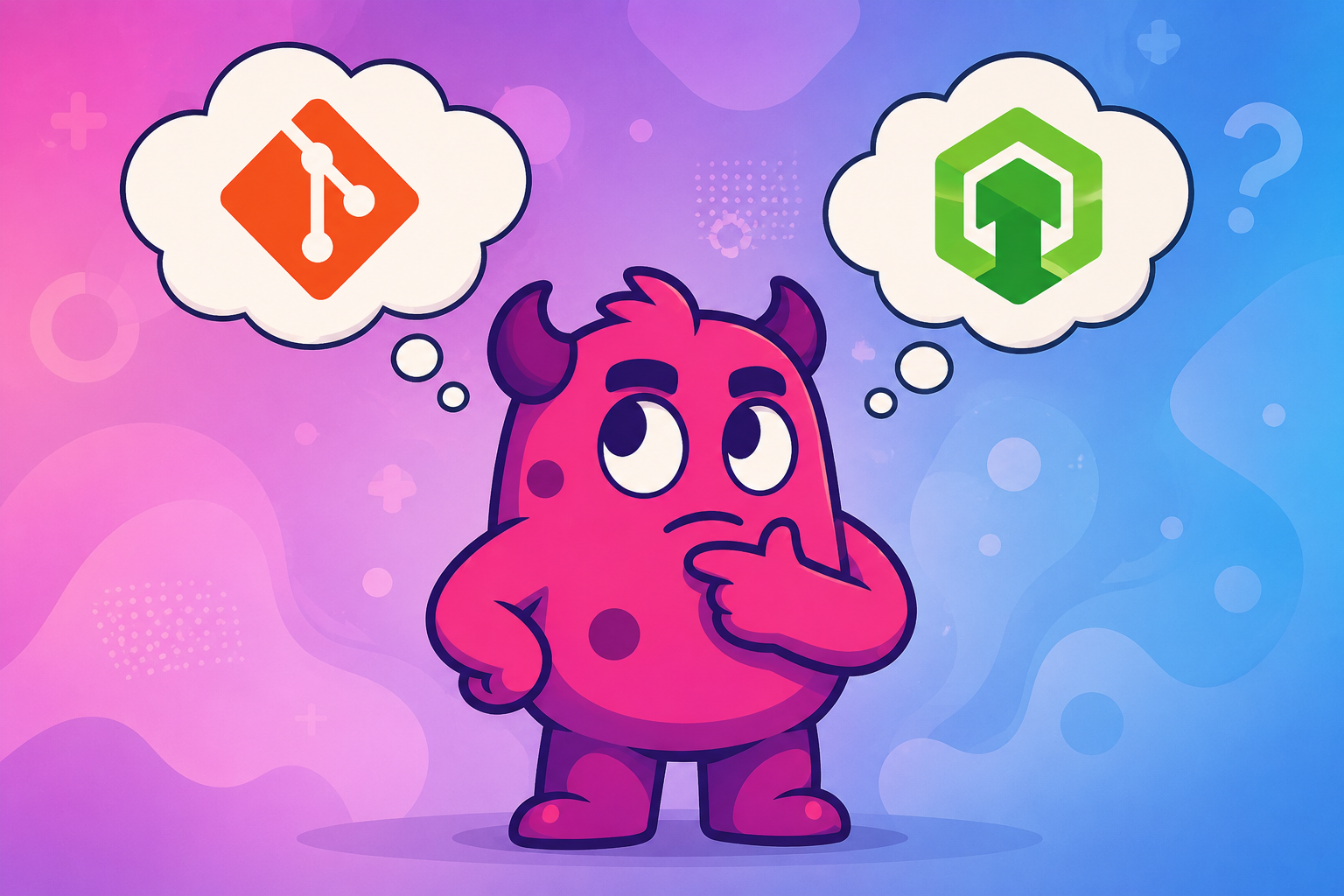
The two most common paths are Git (the world's most widely used version control system) and Unity Version Control (the native option, built on Plastic SCM technology and now part of Unity DevOps). Both can work. But they make very different trade-offs, and choosing the wrong one for your team's composition will cost you weeks of frustration.
The short answer: Git wins on flexibility, ecosystem, and portability. Unity Version Control wins on binary asset handling, artist accessibility, and Unity-native integration. The right choice depends almost entirely on who is on your team and how your assets are structured.
There is also a third dimension that neither tool addresses on its own: making your assets visually browsable, searchable, and accessible to everyone on the team, not just those comfortable inside a VCS client. That is where a digital asset management (DAM) layer like Artstash comes in, and it works regardless of which version control system you choose.
This guide cuts through the marketing copy and gives you a clear-eyed comparison across the dimensions that actually matter for a game studio: binary file handling, team accessibility, pricing, vendor risk, workflow fit, and how to layer visual asset management on top of whichever system you pick.
Key takeaway: According to a 2024 State of Game Technology report by Perforce, Git is used in 66% of game studios. But widespread adoption does not mean it is the right fit for every team, particularly those with large numbers of non-technical contributors.
What Each System Actually Is
Before comparing them, it helps to be precise about what you are actually evaluating. These are not equivalent tools with different UIs; they come from fundamentally different design philosophies.
Git: Distributed, Code-First, Ecosystem-Rich
Git is a distributed version control system (DVCS) created by Linus Torvalds in 2005. Every contributor holds a full copy of the repository history locally, which enables fast branching, offline work, and no single point of failure. Git was designed primarily for source code: plain text files where line-by-line diffs are meaningful and merges can often be resolved automatically.
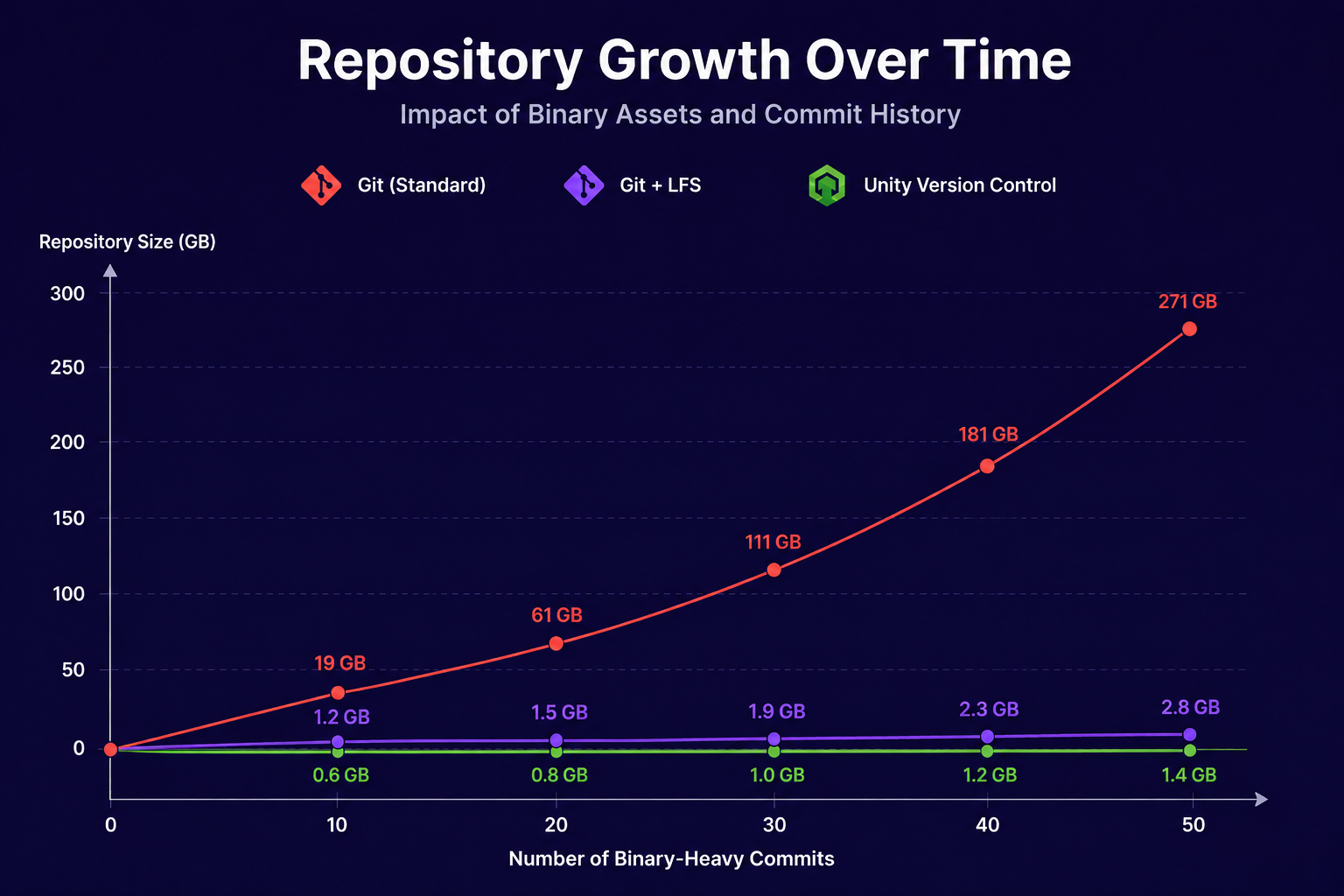
For game development, Git's main limitation is its handling of binary files. When a texture or a 3D model changes, Git stores the entire new file rather than a delta, causing repositories to balloon in size over time. Git LFS (Large File Storage) addresses this by replacing large binaries with lightweight text pointers while storing the actual files on a separate server, but it introduces its own configuration overhead and has known edge cases around reverting large local commits.
Unity Version Control: Binary-Native, Artist-Oriented, Unity-Integrated
Unity Version Control (formerly Plastic SCM, acquired by Unity in 2023) is a purpose-built version control system for game development. Unlike Git, it was designed from the ground up to handle large binary files efficiently and to support both centralised and distributed workflows from a single repository.
Its standout feature for mixed teams is Gluon mode: a simplified, file-based GUI designed specifically for artists, animators, and sound designers who do not want to deal with branching, rebasing, or merge conflicts. Programmers can work in a full distributed mode with branching and merging, while artists use Gluon in the same repository simultaneously.
As of March 2026, Unity revised its DevOps pricing significantly:
| Feature | Previous Model | New Model (from March 2026) |
|---|---|---|
| Seats | Per-seat charges | Unlimited seats, no per-seat cost |
| Free storage | 5 GB-hour | 25 GB per organisation/month |
| Free egress | None | 100 GB per month |
| Overage storage | Variable | $0.14 per GB/month |
| Overage egress | Variable | $0.10 per GB |
This is a meaningful improvement. The removal of per-seat charges in particular makes Unity Version Control significantly more accessible for growing teams.
The Binary Asset Problem: Where Git Struggles Most
This is the crux of the debate for game teams, and it is worth being direct about it.
Unity projects are not pure code repositories. A typical mid-size Unity project might contain thousands of textures, 3D models in FBX or OBJ format, audio files, animation clips, and prefabs. These are all binary files. Unlike a change to a C# script, a change to a 4K texture produces no readable diff. The version control system must store the entire file again.
The consequence for Git: repositories grow with every commit containing binary changes. Clone times slow down. CI/CD pipelines become sluggish. Branching, which is Git's greatest strength, becomes painful when each branch checkout requires downloading gigabytes of assets.
How Git LFS Helps (and Where It Falls Short)
Git LFS solves the repository bloat problem by storing pointers in Git and the actual binary files on a separate LFS server (GitHub, GitLab, Azure DevOps, and others all offer LFS hosting). The main Git repository stays lean.
However, Git LFS introduces friction of its own:
- Setup complexity: Teams need to configure a
.gitattributesfile to define which file types go through LFS. This is a one-time setup, but errors here can result in binaries committed directly to the main repo. - Partial checkouts are not native: Git LFS downloads all tracked files by default, not just the ones you need. For large projects, this means artists pull down assets they will never touch.
- Revert edge cases: Several Unity teams on Reddit have reported that reverting large local LFS commits can leave repositories in an unstable state, particularly when files exceed 2 GB.
- Bandwidth costs: LFS storage and bandwidth are billed separately on most hosting platforms, and costs can escalate quickly for teams iterating frequently on large assets.
How Unity Version Control Handles Binaries
Unity Version Control was designed for this problem. It does not rely on an extension like LFS; binary handling is native to the system. Key advantages:
- Smart Locks: Files can be locked before editing, preventing two artists from working on the same non-mergeable asset simultaneously. Git has no native equivalent.
- Selective checkout via Gluon: Artists can download only the specific files or directories they need, rather than the entire repository.
- No
.gitattributesconfiguration: Binary files are handled automatically without manual file-type declarations.
The practical implication: for teams with a high ratio of binary assets relative to code, Unity Version Control's binary handling is meaningfully less painful to operate day-to-day. For code-heavy projects with moderate asset volumes, Git + LFS is entirely workable and is the setup used by many successful studios.
Artist Accessibility: The Overlooked Deciding Factor
Technical leads often evaluate version control tools from a programmer's perspective: branching model, merge strategy, CI integration. But the real operational cost of the wrong tool shows up somewhere else entirely: in the hours spent onboarding artists, resolving accidental overwrites, and untangling commits made by people who did not fully understand what they were doing.
This is where Unity Version Control has its clearest advantage.
The Git Learning Curve for Non-Programmers
Git's mental model, staging areas, commits, branches, remotes, rebasing, the distinction between HEAD and working tree, is intuitive to developers because it maps to how software engineers think about code. For artists, sound designers, and animators, it is genuinely confusing.
Real-world feedback from Unity teams on r/Unity3D is consistent on this point: artists and sound designers routinely struggle with concepts like merging, rebasing, and branch creation. Incidents where artists commit multi-gigabyte files locally, then struggle to revert when Git LFS cannot cleanly handle the rollback, are a recurring pattern.
Even with a GUI client like GitHub Desktop, artists are still exposed to a workflow designed around code: they need to understand what to stage, when to push, and how to handle conflicts. A single misunderstanding can corrupt a repository or overwrite another team member's work.
Gluon Mode: A Genuinely Different Workflow
Unity Version Control's Gluon mode is not just a simpler interface; it is a different workflow philosophy. In Gluon:
- Artists select only the files they need to work on and download those
- File locking prevents simultaneous edits to non-mergeable assets
- There is no branching or merging required on the artist side
- Check-in is a single action: select files, add a comment, submit
Programmers and artists can work in the same repository simultaneously, with programmers using the full distributed branching model and artists using Gluon's file-based workflow. This is architecturally unusual and genuinely useful for mixed teams.
"For teams with diverse skill sets, Unity's version control offers a more hassle-free experience. Artists and sound designers don't have to deal with concepts they don't need." — Unity3D community discussion, September 2025
The Counter-Argument
The case for Git is not hopeless here. With proper onboarding and a well-configured GUI client, artists can learn Git workflows. The key insight is that this requires an investment: documentation, training, and ongoing support when things go wrong. For teams with a dedicated technical lead who can manage that overhead, Git is workable. For lean indie teams where the lead programmer is also doing everything else, that overhead may simply not exist.
Ecosystem, Portability, and Vendor Risk
This is where Git's advantages are most durable, and where Unity Version Control carries real risk that teams should factor into their decision.
Git's Ecosystem Is Unmatched
Git is open source, vendor-neutral, and underpins an enormous ecosystem of tooling. Services like GitHub, GitLab, Azure DevOps, and Bitbucket all provide Git hosting with varying feature sets and pricing models. CI/CD integrations, code review tools, issue trackers, and deployment pipelines are almost universally built around Git. If you use Git, you are working with the grain of the broader software development ecosystem.
This portability matters. If your hosting provider changes its pricing, you can migrate your repository to another service. If your team grows into a different engine, your version control workflow transfers. If a new team member joins from any software background, they almost certainly already know Git.
Key stat: Microsoft uses Git LFS for its own large-scale projects, demonstrating that Git + LFS is viable even at enterprise scale when configured correctly.
Unity Version Control's Vendor Lock-In Problem
Unity Version Control's deep integration with Unity is both its greatest strength and its most significant risk. The tool is tightly coupled to Unity's cloud infrastructure, and the history of Unity's platform decisions gives some teams pause.
The concerns are legitimate and documented:
- Unity deprecated its previous built-in version control (Unity Collaborate) in under three years, forcing a migration to Plastic SCM.
- Unity's controversial Runtime Fee announcement in 2023 (subsequently cancelled) demonstrated that the company is willing to make significant platform changes that affect studios mid-project.
- Free tier storage limits have caused issues for some studios, leading to project errors when quotas were exceeded before the March 2026 pricing revision.
- Self-hosting requires an Enterprise plan; the standard cloud service means your repository data lives on Unity's infrastructure.
The March 2026 pricing changes (unlimited seats, 25 GB free storage) do address some of these concerns. But the fundamental dependency on Unity's continued investment in the platform remains. As one developer noted in the Unity community: "My main worry about using Plastic SCM is the possibility that Unity might drop support for it again."
A Practical Risk Assessment
| Factor | Git | Unity Version Control |
|---|---|---|
| Vendor dependency | None (open standard) | High (Unity cloud) |
| Self-hosting | Free, many options | Enterprise plan required |
| Migration flexibility | High | Moderate (Git sync available) |
| Ecosystem breadth | Very large | Moderate |
| Platform continuity risk | Very low | Medium |
For studios with long production cycles (3+ years) or those building institutional infrastructure, Git's independence is a material advantage. For studios on shorter cycles who value integration over portability, the risk is more manageable.
For a broader look at how these trade-offs play out across the full VCS landscape, see Perforce vs. Git vs. Unity: Why Your VCS Isn't Your Real Problem.
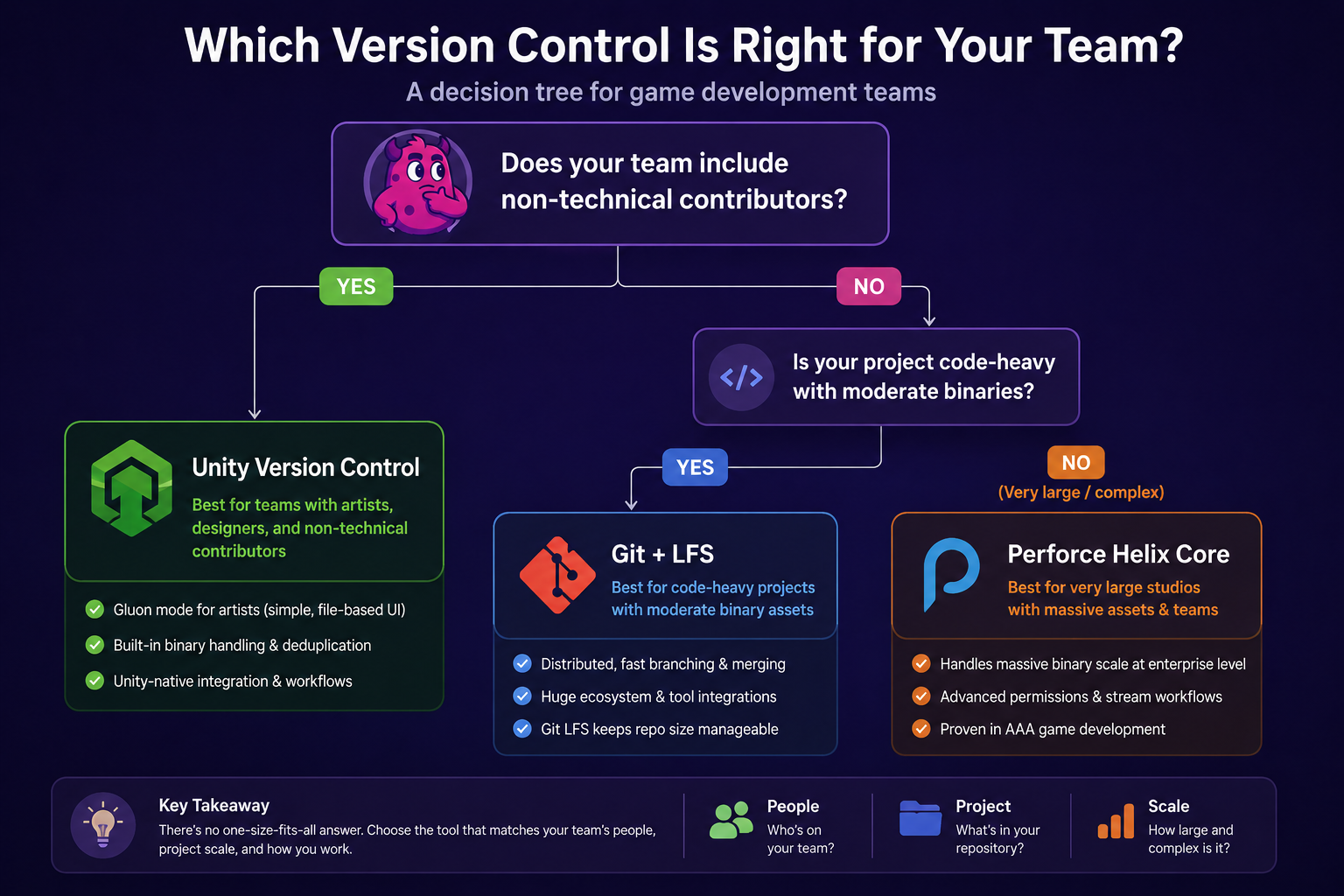
Which Should Your Team Use? A Decision Framework
Rather than a single recommendation, here is a practical framework based on the variables that actually drive the decision.
Choose Git + LFS if:
- Your team is primarily developers with few or no non-technical contributors
- Your project is code-heavy with moderate binary asset volumes (under ~50 GB total)
- You want full portability and no dependency on a single vendor's cloud
- Your team members already know Git and the onboarding cost is low
- You are building infrastructure that may outlast the current engine choice
- You need deep CI/CD integration with standard DevOps tooling
Git is also the right choice if you are a solo developer or a very small team of technically proficient people. The setup overhead is a one-time cost, and the long-term flexibility is substantial. Once your Git repository is set up, you can connect it to Artstash in a few clicks to give every team member, including artists who never open a terminal, a visual, searchable view of every asset in the repository. The VCS workflow stays exactly as it is; Artstash syncs on top of it. Follow the Artstash guide to connecting a Git repository to get started.
Choose Unity Version Control if:
- Your team includes artists, animators, or sound designers who are not comfortable with Git's command-line mental model
- You are managing large binary assets (textures, models, audio) that change frequently
- You want file locking to prevent simultaneous edits to non-mergeable assets
- You value deep Unity Editor integration and want version control accessible directly from the Unity Hub
- You are on a shorter production cycle where vendor risk is less of a concern
- You want both centralised and distributed workflows from a single repository
The Mixed-Team Reality
Most real game studios are not cleanly in either camp. A team of eight might have three programmers, three artists, one designer, and one producer. This is exactly the scenario Unity Version Control was built for.
The honest assessment: if your studio has more than two or three non-technical contributors, the operational cost of managing Git for those people will likely exceed the cost of Unity Version Control's storage fees. The friction is real and ongoing. Unity Version Control's Gluon mode genuinely solves a problem that Git does not.
The scenario where this flips: if Unity changes its pricing model again, deprecates a feature, or makes another platform decision that affects your workflow, you have limited recourse. That risk is real and worth pricing in.
Quick Reference Summary
| Team Profile | Recommended Choice |
|---|---|
| Solo developer or small all-developer team | Git + LFS |
| Mixed team with artists (3+ non-technical) | Unity Version Control |
| Large studio, long production cycle | Git + LFS or Perforce |
| Unity-only team, binary-heavy project | Unity Version Control |
| Multi-engine or engine-agnostic studio | Git + LFS |
| Team prioritising zero vendor dependency | Git + LFS |
The Problem Neither Tool Solves (And How Artstash Addresses It)
There is a dimension of game asset management that both Git and Unity Version Control handle poorly, and it is worth naming before you finalise your choice.
Version control tracks changes to files. It tells you what changed, when, and who changed it. What it does not do is give your team a visual, searchable way to browse, preview, and reuse the assets already in your repository. Finding a specific FBX model, previewing a texture variant, or understanding which assets are in use across scenes: none of that is a version control function.
The result is that studios on both Git and Unity Version Control end up with the same problem: assets get duplicated, renamed inconsistently, or recreated from scratch because no one could find the original. The version control system faithfully tracks every version of every file; it just does not make those files discoverable.
This is the gap that Artstash addresses, and critically, it does so without requiring you to change your VCS. Artstash is a visual digital asset management (DAM) layer that syncs directly with your existing storage and version control, surfacing every asset in a searchable, previewable interface that anyone on the team can use, regardless of their technical background.
Artstash + Git
For teams on Git, Artstash connects directly to your repository and syncs automatically as assets are committed. Every texture, model, audio file, and animation clip becomes browsable and previewable in Artstash without anyone needing to clone the repo or navigate the file system. Artists can search, tag, and share assets from a single interface while programmers continue working in Git exactly as before.
Setting up the connection takes a few minutes. The Artstash Git synchronisation guide walks through the full process.
Artstash + Unity Version Control
For teams on Unity Version Control, Artstash provides the same visual layer on top of your repository. Unity Version Control's Gluon mode already reduces the friction for artists inside the VCS client, but it still requires artists to interact with a version control interface to find and access assets. Artstash removes that requirement entirely: assets are automatically synced and surfaced in a visual DAM that stakeholders, producers, and external collaborators can access without any VCS access at all.
This is particularly useful for mixed teams where Unity Version Control is handling the version control workflow but producers, clients, or content creators need visibility into what assets exist without being added to the repository.
What This Looks Like in Practice
| Workflow | Without Artstash | With Artstash |
|---|---|---|
| Finding a specific texture | Browse file system or search VCS history | Search by name, tag, or metadata in the DAM |
| Previewing a 3D model | Open in DCC tool or engine | In-browser 3D preview, no software required |
| Sharing assets with a client | Export, compress, email | Share a direct link from the DAM |
| Checking asset usage across scenes | Manual audit | Tracked automatically |
| Onboarding a new artist | Clone repo, configure LFS or Gluon | Access DAM immediately, no VCS setup required |
The version control decision matters. But it is only half of the asset pipeline problem. Whichever system your team chooses, Git or Unity Version Control, the asset visibility gap is the same, and a DAM layer is what closes it.
For a broader look at how these tools fit together, the Unity Cloud vs. GitHub comparison covers how the asset management layer integrates into each workflow in more detail.
Frequently asked questions
Is Unity Version Control better than Git for game development?
Neither is universally better. Git wins on flexibility, ecosystem, and portability, making it ideal for developer-heavy or multi-engine teams, while Unity Version Control wins on binary asset handling, artist accessibility, and Unity-native integration, making it the stronger choice for mixed teams with artists.
Can artists use Git without learning the command line?
They can, but even GUI clients like GitHub Desktop still expose artists to staging, pushing, and merge conflicts, and mistakes can corrupt a repository. Unity Version Control's Gluon mode offers a far simpler file-based workflow, and a DAM like Artstash lets artists browse and share assets without touching the VCS at all.
How does Unity Version Control handle large binary files compared to Git?
Unity Version Control handles binaries natively with Smart Locks and selective checkout via Gluon, with no extra configuration needed. Git stores a full copy of each changed binary and needs the Git LFS extension, which adds .gitattributes setup, full-download defaults, and known edge cases when reverting large commits.
Does Artstash work with both Git and Unity Version Control?
Yes. Artstash syncs with your existing Git repository or Unity Version Control setup and surfaces every texture, model, and audio file in a visual, searchable library, including lore-based semantic search via its Search Agent. Artstash's Creative Review plan is free to sign up and use, and paid plans start at $249 per month for Studio Lite, with unlimited users on every plan.