One intelligent layer across the storage your team already uses. Find any packshot, lifestyle shot, 3D product model or ad cut by product, campaign, channel or what is actually in the frame — then preview, review and QC it without moving a single file.
No migration · Connect in minutes · Works with Google Drive, Dropbox, Box & OneDrive
Artstash learns your catalogue and finds any asset from a plain-English search. No SKU codes, no filename conventions, no manual tagging.
Every creative pre-screened against your brand book and channel specs before a human sees it. Fewer revision rounds, nothing off-brand reaching a retailer.
Google Drive, Dropbox, Box and OneDrive. Artstash syncs on top, and your files never move.
Keep your files where they are. Work as if they are all in one place.
The product shots sit in Drive. The retoucher's finals land in Dropbox. Last season's campaign is in a Box folder nobody can name any more. Artstash sits on top of all of it, indexing and previewing without forcing a migration.
Start seeing your assets clearly
No software needed. Artstash previews 57 formats in the browser — PSD, PSB, AI, SVG, TIFF and PDF alongside FBX, OBJ, GLTF, GLB, STL & STEP. Your merchandiser opens a 3D product model without installing anything.
Search by what's in the asset — not what someone named the file.
Find creative by product, campaign, model, set, colourway, channel, aspect ratio, format and metadata.
“Find square packshots of the navy trainer on a white background.”
Artstash enriches every asset automatically, so your team finds the right creative in seconds instead of asking in Slack.
One home for every product asset, built for the way creative teams actually work. No bloat, no learning curve.
🗂️
Every packshot, lifestyle shot, 3D model and ad cut in one place.
👥
Merchandisers, marketers and agency partners. No technical skills, no software.
☁️
Artstash deploys instantly. No installation, no IT project.
🤝
Send finals to retailers, marketplaces & agencies over secure links.
Artstash has a free plan — no credit card required.
Assets stay in the storage you already pay for — Artstash indexes on top.
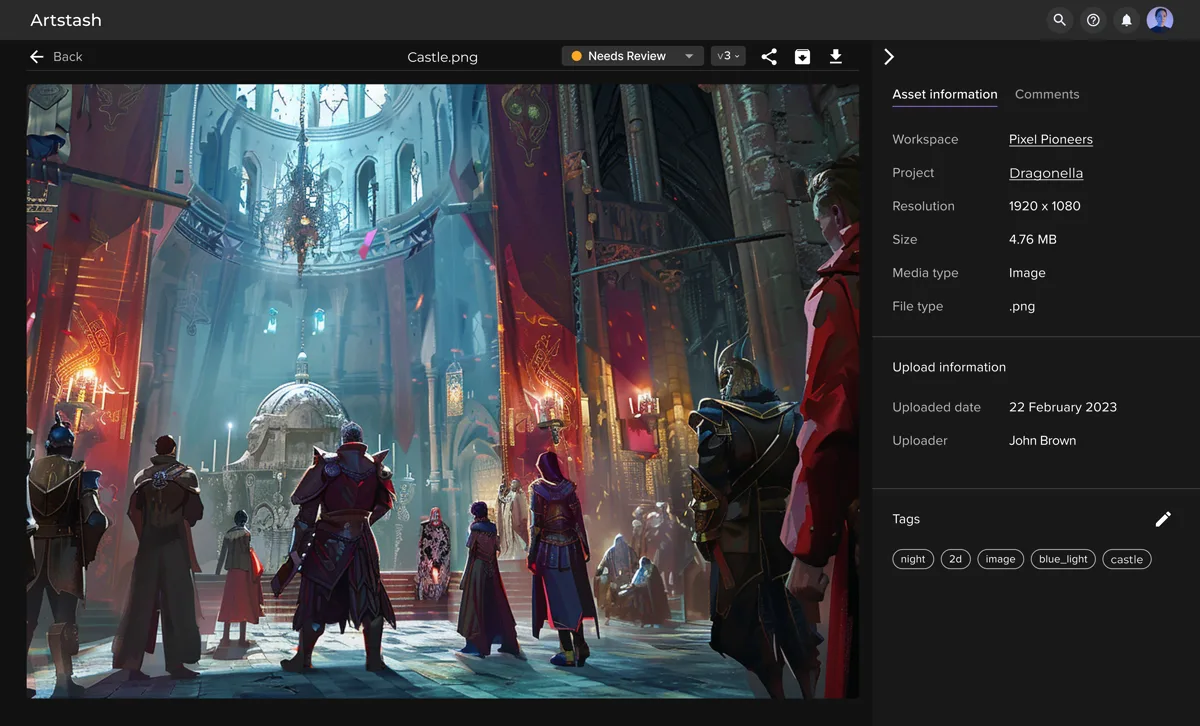
View images, video, HTML5 and 3D product models directly in the browser.
Stop hunting through folders, Slack threads and last year's campaign drive.
Comments, approvals and feedback stay attached to the asset, pinned to the version they were left on.
Automatically tag products, categories, colourways, models and campaign attributes.
Automatically check creative against brand, channel and marketplace requirements.
Let AI do the first round of creative review.
Every new creative can be checked automatically for the things your team normally catches by eye: spelling, logo usage, brand colours, typography, product on the right background, image dimensions and aspect ratios, video duration, legal and promotional disclaimers, pricing claims and channel specs.
Your reviewers make the creative decisions. Artstash handles the checklist.
Connect a source and Artstash starts indexing. Your originals stay where they already live while Artstash makes them searchable, previewable and ready for AI workflows.
Connect in minutes. Keep your existing workflow.
01
Find products, colourways, campaigns and channel cuts in seconds.
02
View PSD, AI, TIFF, FBX, OBJ, GLTF and 50 more formats without specialist software.
03
Designed around seasonal drops and product-level libraries, not generic file storage.
04
The QC Agent reviews every asset against brand and channel rules before it reaches a reviewer.
05
Centralise assets from Google Drive, Dropbox, Box and OneDrive so teams can find, tag and reuse work faster.
Artstash is an AI-powered digital asset management platform for ecommerce and retail creative teams. It connects to the cloud storage you already use, indexes your product photography, 3D models and campaign creative in place, and makes all of it searchable in plain English. It also runs automated brand and channel QC on new creative before a human reviews it.
Files stay in your own storage. Artstash indexes and previews them rather than taking custody of them, so your existing permissions and retention rules keep applying. Access is controlled by role-based permissions with single sign-on (SSO) available, plus private workspaces and secure, revocable share links. The platform runs on Microsoft Azure.
Artstash previews 57 formats with no software installed: 18 image formats, 18 video formats and 19 3D formats, plus PDF and Unreal .uasset. That covers PSD, PSB, AI, SVG and TIFF for design files, and FBX, OBJ, GLTF, GLB, STL and STEP for 3D product models. Blender .blend files are not previewed directly — export to FBX, OBJ, GLTF or GLB and Artstash renders them.
No. Artstash connects to Google Drive, Dropbox, Box and OneDrive and indexes what is already there. Your originals never move and your folder structure stays exactly as your team left it. Most teams connect a source and see assets appearing within minutes.
Yes. The QC Agent reviews every new asset against the rules you define — brand colours and logo usage, typography, image dimensions and aspect ratios, video duration, legal and promotional disclaimers, and channel requirements — and flags problems before the asset reaches a reviewer. It is a first pass, not a replacement for sign-off.
Creative Review is free. Studio Lite is $249 a month, Studio is $799 a month and Studio Plus is $2,499 a month. Every plan includes unlimited users, and annual billing saves 10%. The free plan needs no credit card.
Still researching? Read our complete guide to AI asset management, see how we compare in Artstash vs Air, or compare every plan.
Turn scattered packshots, lifestyle shots, 3D models and ad cuts into a searchable, reviewable, AI-powered creative workspace.
See Artstash in action